
Code Style & Structure
All the rules and why they exist. Naming, types, exports, functions, comments, TSDoc.
Philosophy
Whilst this template has strong opinions, they aren't just about technical pontification, they are there to create a codebase that it's easy to work quickly and sustainably in. At the end of day code is ultimately just the vehicle to get to an outcome, respect the codebase but don't become infatuated with it!
Three principles drive every rule:
- Readable - If it's hard to read, it's wrong. Clarity beats cleverness every time.
- DRY - Don't repeat yourself. Duplication is a maintenance debt that compounds.
- Boring - When in doubt, reach for the obvious solution. Boring code is predictable, debuggable, and easy to hand off.
Naming
Files and folders - kebab-case.
Variables and functions - Full descriptive names, formatErrorMessage not fmtErr.
Components - PascalCase, matching the filename: theme-toggle.tsx exports
ThemeToggle.
Types - PascalCase. Default to type; reach for interface only when
you need declaration merging.
Constants - SCREAMING_SNAKE_CASE for module-level values that are fixed
at build time and semantically "never change"
const ASYNC_INCREMENT_DELAY_MS = 300;
const LOG_LEVEL_DEFAULT = 'info';
Tests - co-located in a __tests__/ subfolder at the same directory level
as the file under test. components/common/theme-toggle.tsx →
components/common/__tests__/theme-toggle.test.tsx. e2e tests and contract tests are the exception. See
Testing for the full picture.
Functions
The rule is based on what the function is
| Kind | Form | Example |
|---|---|---|
| Component | Function declaration | export function Counter() { ... } |
| Exported utility / hook | Arrow function | export const formatCurrency = (n) => ... |
| Callback / inline handler | Arrow function | onClick={() => setTheme('dark')} |
| Class method | Method shorthand | async getById(id: number) { ... } |
Components are always function declarations
Function declarations hoist, which matters for readability in long component files. They also produce cleaner stack traces with a real function name.
// ✅
export function ThemeToggle({ displayName }: ToggleProps) {
  ...
}

// ❌ const arrow - breaks the rule
export const ThemeToggle = ({ displayName }: ToggleProps) => {
  ...
};
Utilities and callbacks are arrow functions
// ✅ exported utility
export const formatErrorMessage = (error: unknown): string => { ... };

// ✅ inline handler
<Button onClick={() => setTheme('dark')}>Dark</Button>

// ✅ store action (arrow in Zustand's set callback is idiomatic)
increment: () => set((state) => ({ count: state.count + 1 })),
Types
type vs interface
Default to type for everything. Only reach for interface when you
specifically need declaration merging e.g. augmenting a third-party module or
a global (declare global { ... }).
The practical reason: type is strictly more capable. It handles unions,
intersections, mapped types, and conditional types. interface adds nothing
over type for regular object shapes.
// ✅ type for object shapes
type ToggleProps = {
  displayName?: string;
};

// ✅ type for unions
type ActionResult<T> = { ok: true; data: T } | { ok: false; error: string };

// ✅ type for intersections (e.g. Zustand store pattern)
type CounterStore = CounterState & CounterActions;

// ❌ interface - adds nothing here, and locks you out of unions later
interface ToggleProps {
  displayName?: string;
}

// ✅ interface - declaration merging is the only valid reason
declare module 'next-auth' {
  interface Session {
    userId: string;
  }
}
Where types live
Two axes decide where a type lives:
- Scope – Who uses it
- Size – How much space it takes
| Scope | Default home |
|---|---|
| One component/module only | Inline at the top of that file |
| 2+ siblings in the same feature folder | types.ts at the feature boundary |
| Shared across unrelated features or layers | src/types/ |
Size can override scope: extract to a sibling types.ts when a single-consumer
file has ~3+ type declarations, a single type is large (>15 lines), or
type declarations are visually drowning the component logic.
// ✅ inline - one consumer, small
type ToggleProps = {
  displayName?: string;
};

// ✅ sibling types.ts - single consumer but file is getting crowded
// components/features/invoice/types.ts
export type InvoiceRow = { ... };
export type InvoiceFormState = { ... };
export type InvoiceFilterParams = { ... };
A single types file is always a flat types.ts sibling, never a types/
folder wrapping one index.ts. Promote to a types/ folder only when the
types themselves split into multiple files.
Always type useState
useState must always carry an explicit type annotation. TypeScript can infer
boolean from false, but relying on inference here can be fragile.
// ✅ explicit - intention is clear, correct type regardless of initial value
const [editing, setEditing] = useState<boolean>(false);
const [item, setItem] = useState<Item | null>(null);
const [count, setCount] = useState<number>(0);

// ❌ implicit - infers boolean from false, but null infers as just null
const [editing, setEditing] = useState(false);
const [item, setItem] = useState(null);
This is enforced by a custom ESLint rule - omitting the type annotation is a lint error that will block your commit.
Imports
Always use import type for type-only imports. Never mix types and values in
the same import statement.
// ✅
import { exampleItemService } from '@/classes/services/example-item';
import type { ExampleItem } from '@/db/types';

// ❌ mixed type and value import
import { exampleItemService, type ExampleItem } from '...';
Always use @/ path aliases - never relative paths. import type { Foo } from '../../types' is a maintenance hazard that silently breaks when files move.
import type { Foo } from '@/types/foo' always resolves from the project root.
Imports are auto-sorted by eslint-plugin-simple-import-sort on every commit:
external packages first, then internal @/ aliases, then relative.
Exports
Named exports everywhere
Named exports make imports refactor-safe (renaming is a compiler error, not a silent runtime break) and keep barrel re-exports predictable.
// ✅ named exports
export function ThemeToggle() { ... }
export const exampleItemService = new ExampleItemService();
export type ActionResult<T> = { ok: true; data: T } | { ok: false; error: string };

// ❌ default export (unless a Next.js file convention forces it)
export default function ThemeToggle() { ... }
Next.js file conventions that require a default export:
page.tsxlayout.tsxerror.tsxnot-found.tsxloading.tsxroute.ts.
The ESLint rule import/no-default-export enforces this, with those files
exempted.
Barrel exports
A barrel is just the index.ts that appears when a folder grows multiple files. It's the same pattern as the component folder grouping. Once a sidebar/
folder has header.tsx, nav.tsx, and footer.tsx inside it, an index.ts
lets callers import from @/components/features/sidebar without knowing the
internal file names. The barrel controls what the outside world sees.
// components/features/sidebar/index.ts
export { SidebarHeader } from './header';
export { SidebarNav } from './nav';
export { SidebarFooter } from './footer';

// Callers import from the folder, not the internals
import { SidebarNav } from '@/components/features/sidebar';
The rules around when to use one:
- ✅ A feature folder with multiple files (
components/features/sidebar/) - ✅ A split utility or domain folder (
utils/formatting/,classes/services/hubspot/) - ❌ A top-level catch-all - never
components/index.tsorhooks/index.ts - ❌ A folder wrapping a single file - the barrel adds nothing until there are multiple files to organise
One important constraint: never mix server and client exports in the same barrel. Tree-shaking can't separate them cleanly and you risk pulling server-only code into the client bundle.
Utilities
Utility functions live in src/utils/.
| Scope | Where |
|---|---|
| Shared across the whole app, domain-agnostic | src/utils/ |
| Specific to one feature | utils/ subfolder inside that feature's component folder |
| Stateful / reusable across components | Extract to a hook in hooks/ |
File structure
The unit is the concern, not the function. A concern is a cohesive group of related helpers - all date formatting, all HTTP response shaping, all currency utilities.
How you package a concern depends on its size:
- Small concern - A single kebab-case file:
- Large concern - A subfolder with an
index.tsbarrel exporting the public surface, and per-topic files inside:
The trigger for promoting a file to a folder is the same as everywhere else in the codebase: ~200 lines, or the file is serving multiple distinct sub-concerns that each have their own test files.
Constants
App-wide values that are fixed at build time live in src/config/constants/.
One file per concern, named for what it contains.
api-routes.ts
Every internal /api/* path consumed by an SWR hook is defined here.
Defining paths as named constants gives you one place to update when a route changes rather
than hunting for string literals across the codebase.
Before removing a route, check this file first! If it appears here, a hook depends on it.
Use a plain string for flat routes, a builder function for parameterised ones:
export const API_ROUTES = {
  /** `GET /api/example-items` - list all example items. */
  exampleItems: '/api/example-items',

  /**
   * @param id - The numeric ID of the example item.
   * @returns The resolved path, e.g. `/api/example-items/42`.
   */
  exampleItem: (id: number) => `/api/example-items/${id}`,
} as const;
external-urls.ts
Every URL pointing to a service outside this application is defined here. Hooks and contract tests import the same constant, which ensures no drift between the two.
export const JSONPLACEHOLDER_BASE_URL =
  'https://jsonplaceholder.typicode.com' as const;

/** SWR cache key and fetch URL for the posts demo list (3 posts). */
export const JSONPLACEHOLDER_POSTS_KEY =
  `${JSONPLACEHOLDER_BASE_URL}/posts?_limit=3` as const;
Services (backend)
Each domain gets its own folder with an index.ts as the entry point. This
isn't ceremony for the sake of it! A service domain naturally grows parts over time (the main
class, split types, sub-services), and the folder gives it room to do that while
index.ts controls what the outside world sees.
The same pattern applies to
loggers: classes/loggers/application/ and classes/loggers/query/ are two
separate concerns, each with their own folder.
All backend business logic and third-party integrations live as classes in
src/classes/services/<domain>/. Route handlers and server actions call service
methods (not Drizzle, Clerk, or any external API directly).
A class gives the service a clear public surface (the methods you expose) and a clean private interior (the HTTP client, DB connection, or config that callers don't need to see).
// ✅ service encapsulates the data access
const item = await exampleItemService.getById(id);

// ❌ route handler reaching Drizzle directly
const rows = await db.select().from(exampleItemsTable).where(eq(...));
A few rules of thumb to follow:
- Default to a singleton - Declare the class, then export one instance.
class ExampleItemService {
  async getById(id: number): Promise<ExampleItem | null> { ... }
  async create(input: ExampleItemInput): Promise<ExampleItem> { ... }
}

// One export, no getInstance() ceremony
export const exampleItemService = new ExampleItemService();- Prefer composition over inheritance. See Inheritance and composition for examples and when inheritance is the right call.
- Reach for the factory pattern when the service carries per-request state. See module-scoped instances vs factory
Services in classes/services/ are server-only. They import server-only
at the top of the file and must never be imported from client components or
hooks.
Comments
Code comments are a massively underutilised resource. How many times have you returned to something a year later with no idea why it was done that way? Seemingly odd or suboptimal solutions often have a perfectly good business or technical reason behind them, it just never got written down. The person who inherits that code (often future you) is left guessing. Comments are where that context lives!
This template enforces documentation via ESLint. The intention is to get you (and any agent working alongside you) to write clear reasoning for why something is implemented the way it is. Not what a function produces, but why it exists and why it's shaped the way it is.
The goal is clear and concise code commentary and notation – not verbosity!
Commentary
Notes for whoever reads this source file, the why behind a decision, a gotcha, a non-obvious constraint. Don't just simply describe what the code does.
- One-liner: always
// - Multi-line: always a
/* */starred block
// ❌ documents the what - the code already says this
// Map over items and multiply price by 1.2
const prices = items.map((item) => item.price * 1.2);

// ✅ documents the why - this is what a reader actually needs
/*
 * Prices are stored ex-VAT in the DB; multiply by 1.2 to display
 * the customer-facing figure. VAT rate is fixed by contract until 2026.
 */
const prices = items.map((item) => item.price * 1.2);
// ✅ single-liner - always //
// Delay matches the animation duration in the design spec (300ms)
const TRANSITION_MS = 300;
// ✅ multi-line - always /* */
/*
* next-themes can only resolve the active theme on the client, so the
* first server render must not commit theme-dependent markup. Flipping
* `mounted` after mount is the documented guard against the resulting
* hydration mismatch.
*/
useEffect(() => {
setMounted(true);
}, []);TSDoc
On exported .ts symbols, documentation is enforced on pre-commit by two
plugins covering non-overlapping concerns: eslint-plugin-jsdoc handles
presence and structure (require-jsdoc, require-param, require-returns)
while eslint-plugin-tsdoc handles syntax (tsdoc/syntax, validating that
the comment follows the TSDoc spec). Both are needed because tsdoc alone lints
only comments that already exist - it has no require-* rule, so it can't
force an undocumented symbol to be documented. For .tsx components this is
advised but not linted.
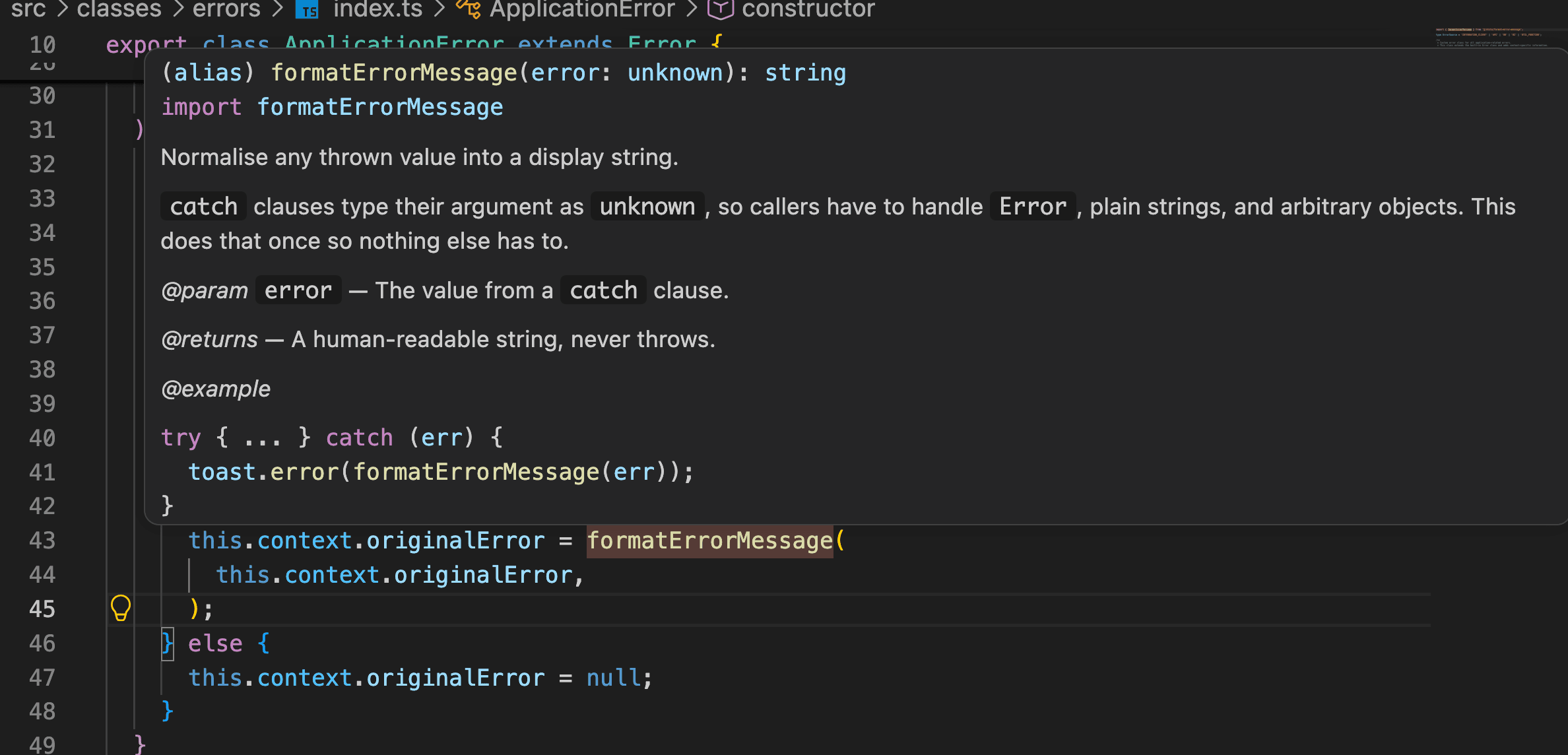
TSDoc (/** */) is documentation attached directly above an exported function,
type, or component. When you hover over a call site in your editor, the TSDoc
block is what surfaces. It's the difference between seeing a type signature and
understanding what the function actually does and why it exists.
/**
 * Normalise any thrown value into a display string.
 *
 * `catch` clauses type their argument as `unknown`, so callers have to handle
 * `Error`, plain strings, and arbitrary objects. This does that once so nothing
 * else has to.
 *
 * @param error - The value from a `catch` clause.
 * @returns A human-readable string, never throws.
 * @example
 * ```ts
 * try { ... } catch (err) {
 *   toast.error(formatErrorMessage(err));
 * }
 * ```
 */
export const formatErrorMessage = (error: unknown): string => { ... };
Hovering formatErrorMessage anywhere it's called surfaces that explanation inline, no
hunting for the definition.
Tooling directives (eslint-disable, @ts-expect-error, prettier-ignore)
are exempt from both rules
Shape
Lead with what in one line, then why it exists / when to use it (if
that's not obvious from the name alone). Then @param for parameters,
@returns, and one @example
/**
 * Normalise any thrown value into a display string.
 *
 * `catch` clauses type their argument as `unknown`, so callers have to handle
 * `Error`, plain strings, and arbitrary objects. This does that once so nothing
 * else has to.
 *
 * @param error - The value from a `catch` clause.
 * @returns A human-readable string, never throws.
 * @example
 * ```ts
 * try { ... } catch (err) {
 *   toast.error(formatErrorMessage(err));
 * }
 * ```
 */
export const formatErrorMessage = (error: unknown): string => { ... };
Components
/**
 * Dropdown for switching between light, dark, and system themes (next-themes).
 *
 * @param displayName - Optional label rendered beside the toggle icon.
 * @example
 * ```tsx
 * <ThemeToggle displayName='Theme' />
 * ```
 */
export function ThemeToggle({ displayName }: ToggleProps) { ... }
Example and reference files
Any file that exists to demonstrate a pattern opens with EXAMPLE <TYPE> as
the first line of its TSDoc:
Accepted forms: EXAMPLE COMPONENT, EXAMPLE HOOK, EXAMPLE STORE, EXAMPLE UTILITY, EXAMPLE SERVICE CLASS. This makes example files greppable and
immediately obvious to any reader or agent.
/**
 * EXAMPLE SERVICE CLASS
 *
 * The reference domain service for the template...
 */
Linting and formatting
ESLint and Prettier run automatically on every commit via lint-staged. You
shouldn't need to think about formatting - save, commit, let the tools handle it.
pnpm lint          # ESLint across the project
pnpm typecheck     # tsc --noEmit
If you need to disable a lint rule, always leave a comment explaining why:
// eslint-disable-next-line react-hooks/set-state-in-effect -- mount-only hydration guard, see comment above
setMounted(true);
Never disable rules silently. If you're suppressing the same rule repeatedly, the rule is probably wrong for the project.