
Vercel
Domain, Vercel and Clerk production setup.
The full deployment stack is Cloudflare (domain + DNS) → Vercel (hosting) → Clerk (auth)
What is DNS (Domain Name System) and what is a CNAME?
DNS is the internet's address book - it maps human-readable
names like yourproject.dev to the servers that handle requests for them. A
CNAME record says "this subdomain is an alias for another domain". This
guide uses CNAMEs in two places: Vercel uses them to route www.yourproject.dev
and docs.yourproject.dev to its hosting infrastructure, and Clerk uses them
to route auth subdomains like accounts.yourproject.dev to its own servers.
This is how both services handle traffic that appears to live on your domain
without you hosting anything yourself.
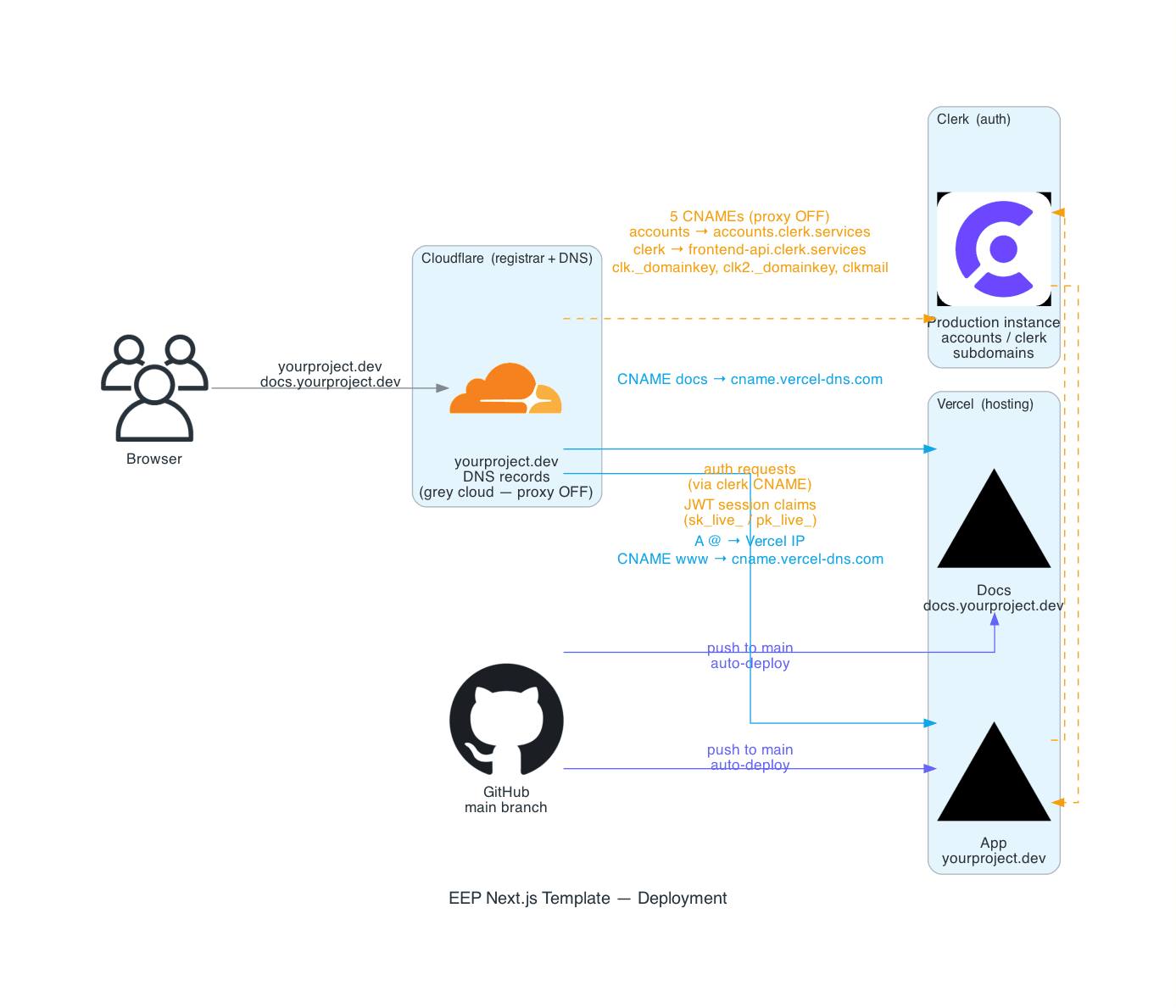
Clerk production instances require a custom domain you own. *.vercel.app
URLs are not supported - Clerk needs to set DNS records on your domain, which
isn't possible on a domain Vercel owns. If you don't have a domain yet, you
can use the Clerk dev keys but there are limitations and this is not advised
for a production app
Using dev keys (quick start)
If you don't have a custom domain yet, you can deploy with Clerk development keys
(pk_test_ / sk_test_) on the Vercel-generated URL. This gets the app running
immediately and is fine for personal testing. When you have a domain, create a
production Clerk instance and swap the keys out.
Limitations of dev keys:
- Stricter rate limits
- Email/SMS capped at 100 emails / 20 SMS per month
- Clerk shows a warning banner in the UI
Step 1 - Buy a domain
Cloudflare Registrar sells domains at cost with free DNS management.
Step 2 - Deploy to Vercel
The Clerk sign-in won't appear until Step 3 is complete. Once deployed you'll see your app with its heading, but Clerk won't load until the production instance and DNS records are set up
Step 3 - Set up a production Clerk instance
Now that your domain is live, create the Clerk production instance pointed at it.
Google SSO (optional)
On a Clerk dev instance, Google SSO works locally with zero GCP setup - Clerk uses shared credentials under the hood. You only need your own GCP OAuth client for a production instance.
Step 4 - Run production migrations
Vercel does not run migrations automatically. After the first deploy:
DATABASE_URL=postgresql://... pnpm db:migrateAutomating migrations as part of the deployment pipeline is on the roadmap. For now, run them manually after each deploy that includes schema changes.
Step 5 - Verify
Trigger a fresh Vercel deployment (push a commit, or redeploy from the dashboard) to pick up the Clerk production env vars, then confirm:
- App loads at your domain
- Sign-in and sign-up flows complete without errors
- Google SSO redirects correctly (if enabled)
If sign-in fails, the most likely causes are: Clerk DNS records not yet propagated, Cloudflare orange cloud proxy enabled on a Clerk record, or the GCP OAuth redirect URI not updated after adding your domain.
DNS records summary
All records live in the same Cloudflare DNS panel:
| Type | Name | Value | Proxy | Purpose |
|---|---|---|---|---|
A | @ | Vercel IP | DNS only | App apex domain |
CNAME | www | cname.vercel-dns.com | DNS only | www redirect |
CNAME | docs | (Vercel-provided) | DNS only | Docs subdomain |
CNAME | accounts | accounts.clerk.services | DNS only | Clerk auth |
CNAME | clerk | frontend-api.clerk.services | DNS only | Clerk Frontend API |
CNAME | clk._domainkey | (Clerk-provided) | DNS only | Email DKIM signing |
CNAME | clk2._domainkey | (Clerk-provided) | DNS only | Email DKIM signing |
CNAME | clkmail | (Clerk-provided) | DNS only | Clerk email sending |
Subsequent deploys
Every push to main triggers an automatic Vercel deployment. You only need to:
- Re-run
pnpm db:migrate(against productionDATABASE_URL) when a deploy includes new migrations - Update Vercel env vars if new ones are added to the schema
Troubleshooting
These are the issues you're most likely to hit, documented from going through this setup end to end.
Failed to load Clerk JS / failed to load script: /__clerk/...
The Clerk JS bundle loads via the clerk CNAME (clerk.yourdomain.dev →
frontend-api.clerk.services). This error means that record either hasn't
propagated yet or wasn't added.
- Confirm the
clerkCNAME is in Cloudflare DNS set to DNS only (grey cloud) - Even after Clerk shows DNS as verified, redeploy on Vercel - the running build needs to pick up the verified domain configuration
- Try a fresh incognito window after redeploying to avoid browser DNS cache
Unable to attribute this request to an instance / publishable key error
This means the publishable key in your Vercel env vars either doesn't match the production Clerk instance, or the instance hasn't fully activated yet.
- Confirm
NEXT_PUBLIC_CLERK_PUBLISHABLE_KEYstarts withpk_live_(notpk_test_) in Vercel → Settings → Environment Variables - Make sure it's set for the Production environment, not just Development
- After updating the key, redeploy - this var is baked into the bundle at build time so updating it without redeploying has no effect
- If the key is correct and the error persists, wait a few minutes - Clerk's production instance takes time to fully activate after DNS verification. This is normal and will resolve on its own
Docs build fails on Vercel (routes-manifest ENOENT or @vercel/otel)
When deploying the docs site (root directory docs/) the build can fail two ways:
ENOENT: ... .next/routes-manifest-deterministic.jsonModule not found: Can't resolve '@vercel/otel'(a file that belongs to the root app'ssrc/instrumentation.ts, not the docs package)
Both trace back to Next 16 defaulting to Turbopack for next build.
Turbopack writes .next/routes-manifest-deterministic.json, but Vercel's Next
adapter looks for the classic routes-manifest.json and fails with ENOENT
(vercel/next.js#88579). The
@vercel/otel variant is the same root cause surfacing through Turbopack's
workspace-root inference dragging the repo root's src/ into the docs graph.
The fix is to build the docs site with webpack instead of Turbopack. The docs
build script is pinned to next build --webpack, which writes the classic
manifest and resolves next without any turbopack.root / outputFileTracingRoot
tuning. next dev still uses Turbopack, so local dev speed is unaffected.
If you still hit this, confirm:
- The Root Directory in Vercel project settings is
docs(not empty) docs/package.json'sbuildscript still passes--webpack
Docs site builds but every path 404s
The build goes green, but visiting the deployed docs URL returns Vercel's
edge-level NOT_FOUND on every path (including /):
404: NOT_FOUND
Code: NOT_FOUND
ID: lhr1::...
This is not a code or build problem - the output is correct. A green build that
404s site-wide means Vercel served the .next output as static hosting
instead of running the Next.js server, so none of the routing or server
functions are wired up. It happens when the docs project's Framework Preset
is "Other" rather than Next.js, which in turn happens when the Root
Directory wasn't set to docs at the moment the project was imported.
Changing the Root Directory or Framework Preset after the fact on an existing
project doesn't always re-run detection cleanly. The reliable fix is to delete
the docs Vercel project and re-import it, setting Root Directory = docs on the
import screen so the Next.js preset auto-detects:
- Delete the docs project (Settings → Advanced → Delete Project). This does not touch your repo or the main app project.
- Re-import the same repo (Add New → Project), and on the import screen set
Root Directory to
docsbefore deploying. - Confirm Framework Preset now reads Next.js (not "Other"), Build
Command is default (it picks up
--webpackfromdocs/package.json), and Output Directory is empty. - Deploy.
The docs site needs no environment variables to render. OPENROUTER_API_KEY
(and optional OPENROUTER_MODEL) only power the AI chat search on /api/chat -
add them later; their absence never causes the 404.
DNS_PROBE_FINISHED_NXDOMAIN / "This site can't be reached"
The Vercel domain shows valid, but the site won't load and the browser
reports DNS_PROBE_FINISHED_NXDOMAIN. This almost always means the record is
live globally but your machine's resolver still has a stale (empty) cached
answer. Confirm which side is stale before doing anything else.
Check what the public resolvers return versus your local one:
# Authoritative answer via Cloudflare and Google (what the world sees)
dig +short docs.yourproject.dev @1.1.1.1
dig +short docs.yourproject.dev @8.8.8.8

# What your own machine currently resolves
dig +short docs.yourproject.dev
If the first two print the Vercel target (e.g.
220fb9f65be55b09.vercel-dns-017.com.) but the last one is empty, the record
is fine and only your local cache is stale. Flush it:
sudo dscacheutil -flushcache && sudo killall -HUP mDNSResponderThen fully quit and reopen the browser (Chrome also caches internally - clear
it at chrome://net-internals/#dns → Clear host cache), or use an incognito
window, and load https://docs.yourproject.dev.
.dev is HSTS-preloaded, so it only loads over https://. Plain http://
won't work by design - always test the https:// URL.
If the public resolvers also return nothing, the record itself is wrong or hasn't propagated - recheck the CNAME name, target, and that the proxy is grey (DNS only) in Cloudflare.
Clerk DNS shows verified but the sign-in component still fails
Clerk's verification and the browser resolving the DNS are independent. Clerk checks from its own servers; your browser checks from your local DNS resolver. After Clerk verifies:
- Confirm the record resolves publicly but not locally (see
DNS_PROBE_FINISHED_NXDOMAINfor thedigchecks), then flush your local DNS cache:sudo dscacheutil -flushcache && sudo killall -HUP mDNSResponder - Try an incognito window
- Redeploy on Vercel to ensure the build reflects the verified state